Go live on every platform from one control center
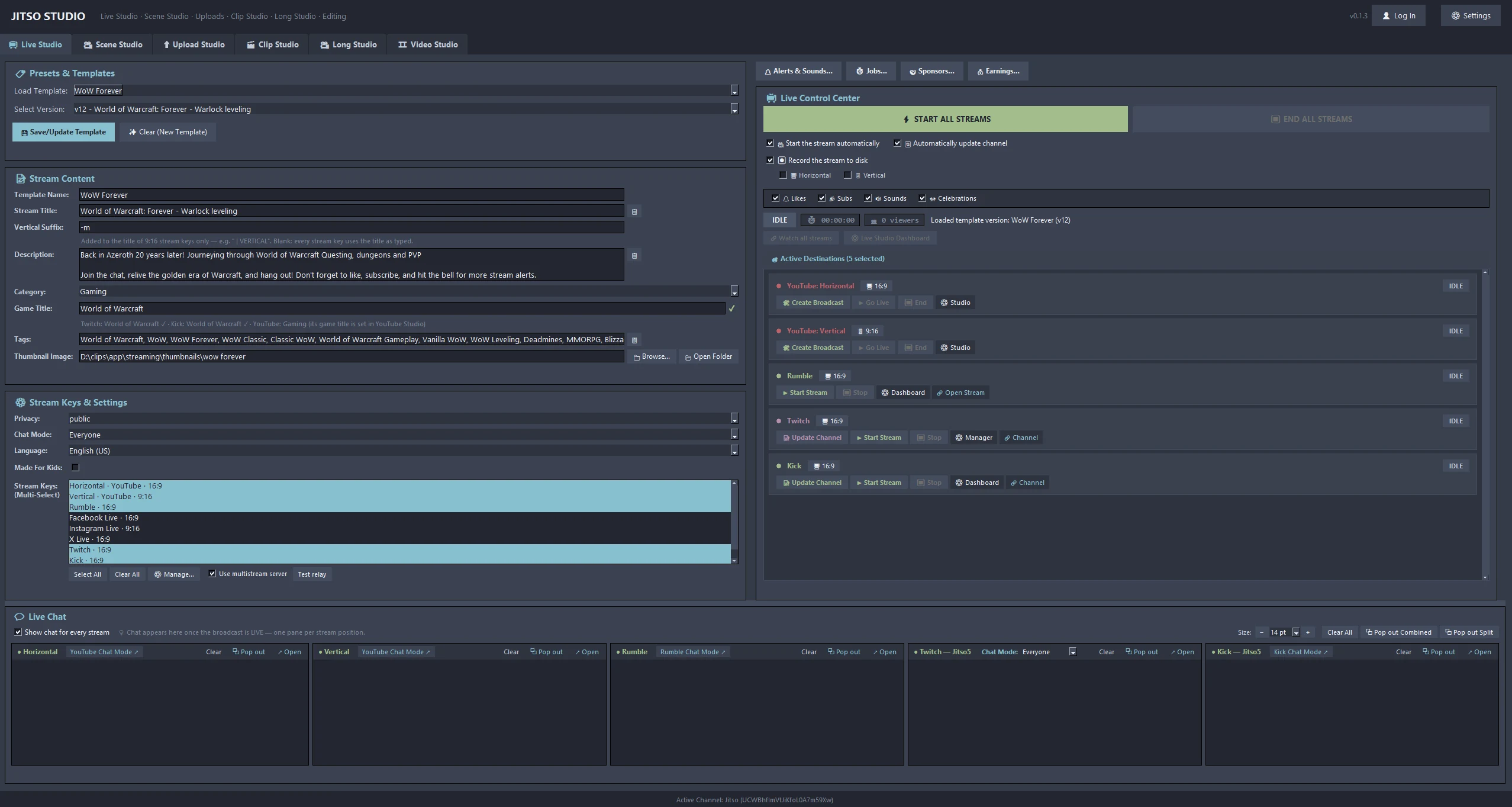
Set your title and game category once. When you hit GO LIVE they are sent to your YouTube, Twitch and Kick channels, and a clean recording lands on your disk.
Live Studio in detail
Title and category sync
GO LIVE sets your title and game category on YouTube, Twitch and Kick, then reads the channel back so you can see what is actually set.
Game title autocomplete
Type a game and it suggests matches from the ticked platforms' own catalogues. A mark shows whether each platform has it, and a platform that lacks the category asks you to pick from its own list.
Stream templates
Title, category and thumbnail are saved in versioned templates, so tonight's stream starts from last time's settings.
Stream keys
Every key has its own canvas (16:9 or 9:16), encoder (NVENC, Quick Sync, AMF or CPU), bitrate and preset. Platform bitrate recommendations help you avoid dropped ingest, and keys and ingest URLs copy with one click.
Chat panes
One chat pane per ticked key, side by side or combined, with pop-out windows. Moderation covers word filters, timeouts and message purge, and you can toggle slow, subscribers-only, followers-only and emote-only modes.
Record while you stream
A clean VOD is written to disk in a folder per game, ready for Clip Studio. Viewer counts are shown per platform and combined.
From start to finish
Pick a template
Choose or edit the title, category, game and thumbnail.
Tick stream keys
Select the destinations for this stream. Chat panes appear for each ticked key straight away.
START ALL
The app checks categories, then sends the stream to every ticked destination.
Watch and moderate
Follow chat, alerts and viewer counts. END closes the broadcasts.
Good to know
- A stream with only Twitch or Kick keys needs no Google sign-in and no YouTube thumbnail.
- Vertical Suffix: an optional text added to the title only for keys on the 9:16 canvas, so a portrait stream is not a second video with an identical name.
- YouTube chat is read without using Google API quota.
- Facebook, TikTok, Instagram and other RTMP-only destinations receive the stream; their title is set on the service itself.
Related features
Transform your creator workflow today
Stream live, let AI curate your highlights, and publish your clips to YouTube and other platforms.