Condense a 4-hour stream into a 20-minute mastercut
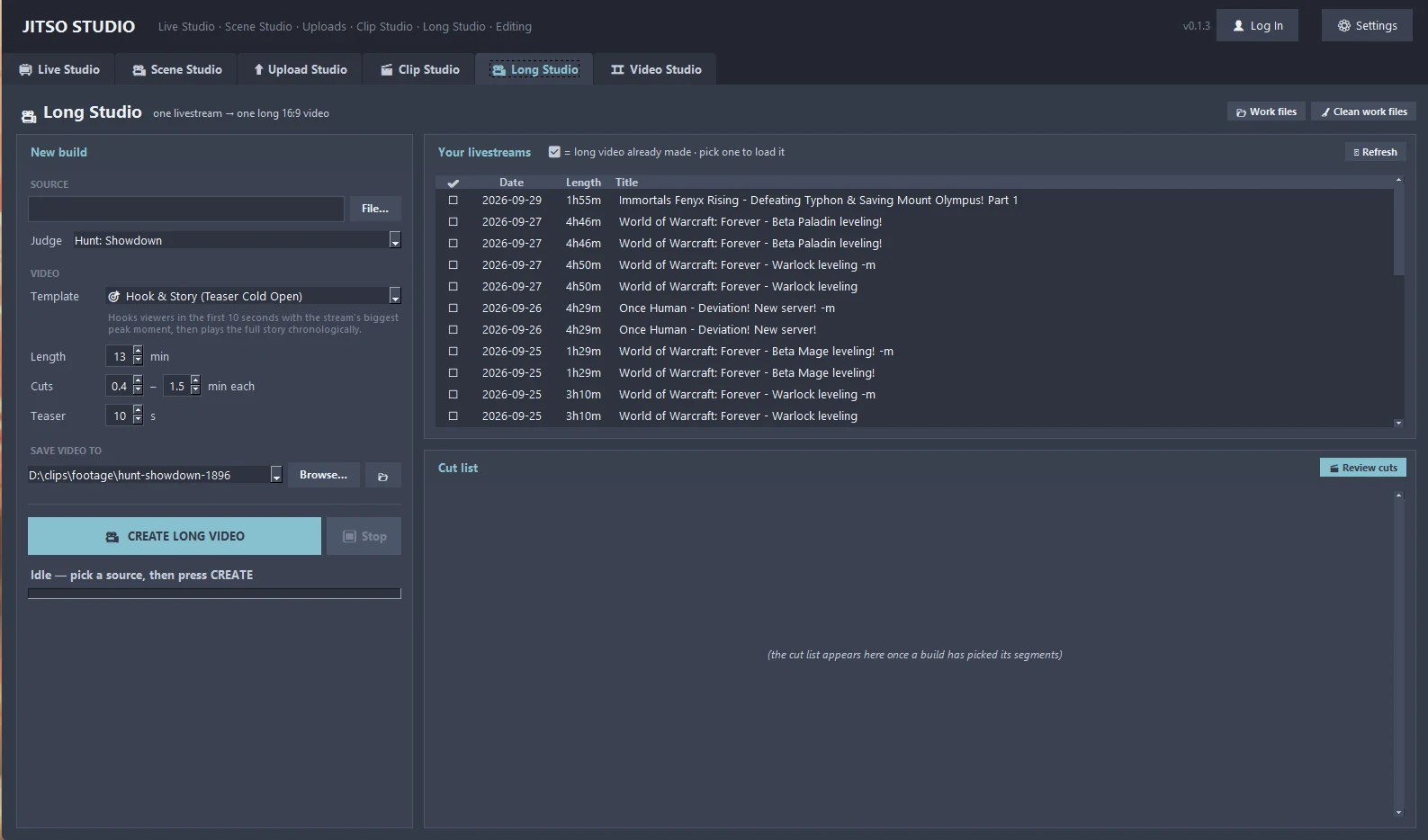
Pick a past livestream, set a target length in minutes, and Long Studio stitches the most exciting moments, in order, into one long-form video.
Long Studio in detail
Target length
Tell it how many minutes you want. It picks enough of the best moments to reach that length.
Chronological
Segments stay in the order they happened, so the result still tells the story of the stream.
Reviewable cut list
See every segment before rendering. Open one in the player, move its start and end, or remove it.
Channel livestream sync
Finds your past livestreams and tracks which ones you have already processed.
Same judges as Clip Studio
Scoring follows the game's judge, so the moments chosen match what you would clip by hand.
From start to finish
Pick a stream
Choose a past livestream from your channel or a local recording.
Set the length
Enter the target duration in minutes.
Review the cut list
Check, trim or drop segments.
Render
One long-form video, ready to upload.
Good to know
- Edits to a cut-list entry apply instantly, because nothing is rendered until you build the video.
Related features
Transform your creator workflow today
Stream live, let AI curate your highlights, and publish your clips to YouTube and other platforms.